> ## Documentation Index
> Fetch the complete documentation index at: https://docs.mefriend.ai/llms.txt
> Use this file to discover all available pages before exploring further.
# Control Every Word You Create (v1.14 – Nov 3 2025)
> Intent-Based Regeneration, Refine Mode, and Subscriber Boost put you in the driver's seat of every conversation.
No more random swipes. No more slot machines.\
Every regen now listens to you, and every word you write can be expanded into something beautiful. ✨
## 1) 🎯 Intent-Based Regeneration
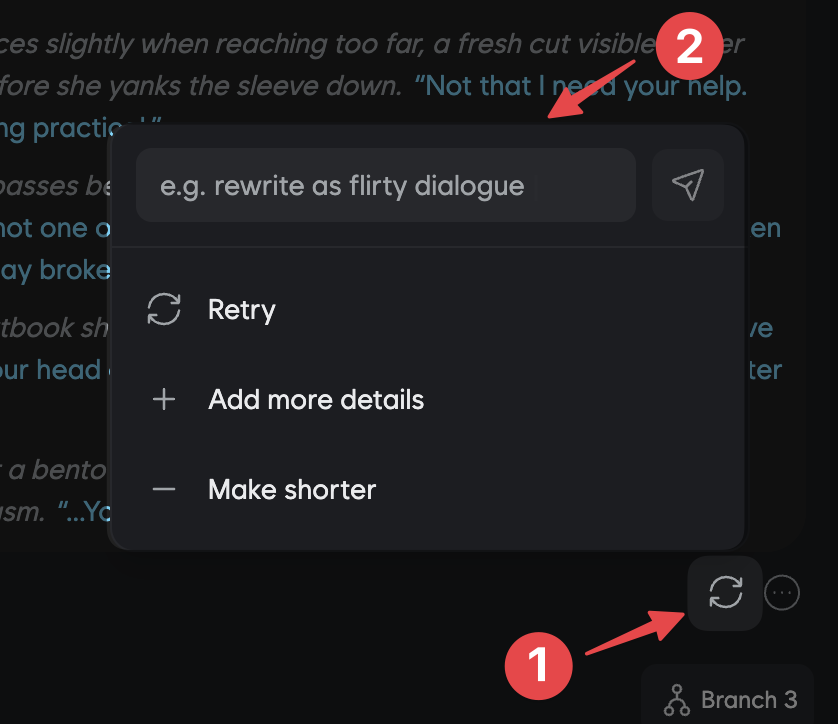
Every regen obeys you—steer tone, length, plot, and style with a single
command.
Say goodbye to mashing the regenerate button 10+ times hoping for something different. Now you can tell the AI *exactly* how to rewrite the response.
### How It Works
1. Click the **Regeneration** icon on any AI response
2. Type or select your intent (free-form or from presets)
3. Get a rewritten response that follows your exact direction
### Intent Examples
"Make it darker" · "More romantic" · "Add tension" · "Lighter and funnier"
"Triple the length" · "Short and punchy" · "Add more detail"
"Branch to a new plot: she refuses the deal" · "Advance the story with a
twist"
"First-person inner monologue" · "Show more sensory details" · "Increase
dialogue"
**Pro Tip**: Combine multiple intents like "longer, more romantic, with inner
thoughts" for precise control over the narrative direction.
***
## 2) ✨ Refine Mode: Transform Your Input
Type simple stubs—AI expands them into rich, in-persona dialogue that matches
your character perfectly.
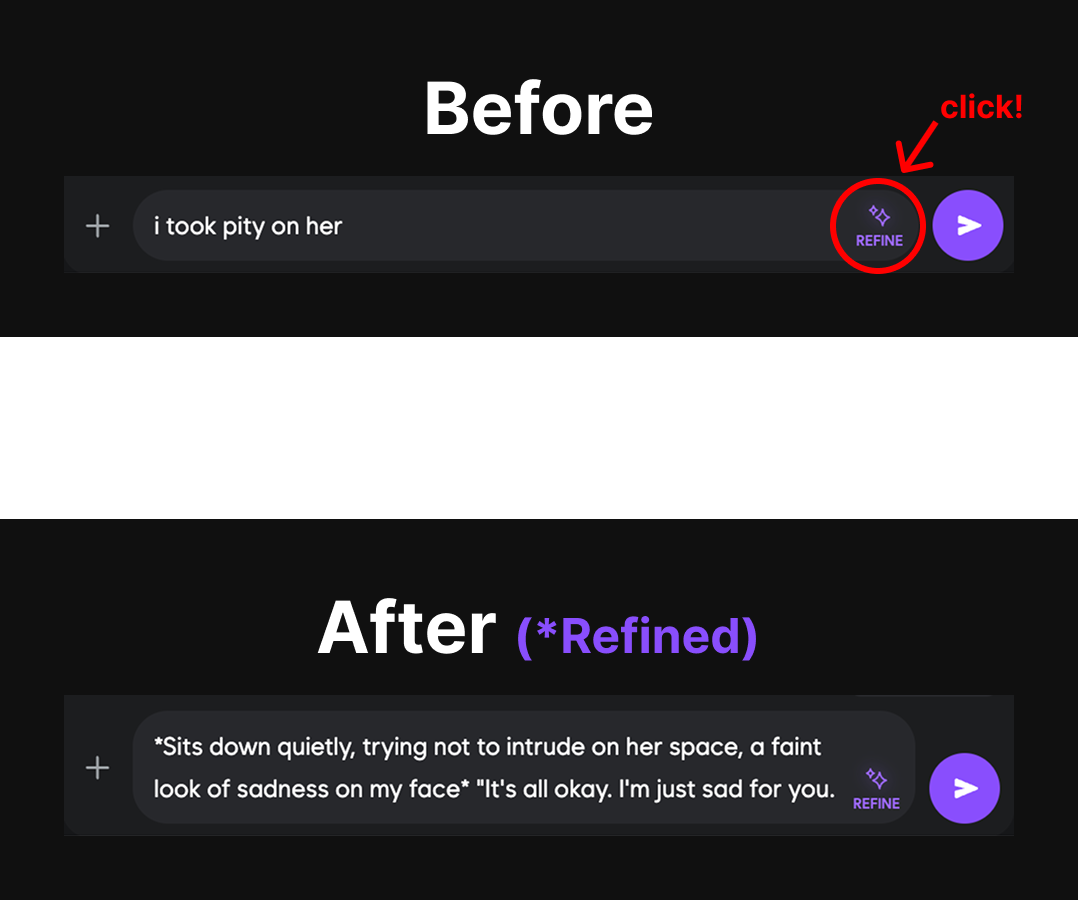
Ever know *what* you want to say but not *how* to phrase it in character? Refine Mode turns your rough ideas into polished, vivid responses.
### Real Example
**Before (your input):**
```
i took pity on her
```
**After (Refined):**
```
*Sits down quietly, trying not to intrude on her space,
a faint look of sadness on my face*
"It's all okay. I'm just sad for you."
```
Automatically matches your character's tone, quirks, and personality
Takes context from the conversation to write grounded, natural responses
Skip the struggle of crafting the perfect line—get it instantly
Review the refined version before sending to ensure it's exactly what you
want
Perfect for when you're in a creative flow but want the AI to handle the
descriptive heavy lifting.
***
## 3) 🚀 Subscriber Boost: Auto Best Model
Automatic smart routing to the highest-tier model for your plan—better
outputs, zero setup.
No toggles. No configuration. Just better quality automatically.
### How It Works
When you use **Regeneration** or **Auto**, the system automatically selects the best available model based on your subscription tier:
Optimized routing within available models
Auto-routes to **Titan** for premium quality
Access to the absolute best models available
**Example:**\
Your preset = Titan · Your plan = Prime → uses **Titan** 🚀\
No extra cost. No extra clicks. Just better responses.
Subscriber Boost works seamlessly with both Intent-Based Regeneration and
Refine Mode, ensuring you always get the highest quality output your plan
allows.
***
## 4) 🎨 Why This Matters
### The Problem We Solved
Before this update, users faced three major frustrations:
* **Random Regeneration**: Hit "regen" 10+ times hoping for something different
* **Weak Input Expression**: Know what you want to say but can't phrase it well in character
* **Inconsistent Quality**: Not getting the best possible output from your subscription
### The Solution
Direct every regen with specific intent instead of random retries
Turn rough ideas into polished, in-persona prose
Always get the best model your plan allows, automatically
One guided regen often beats 3 random ones—save time, maintain flow
***
## 5) ✨ Quality-of-Life Features
Quick-apply common intents: tone shifts, pacing changes, POV switches
View original vs. intent-based regen to see exactly what changed
Maintains character voice even when shifting tone, length, or style
All intents respect your plan's content policies
***
## 6) 🎯 Common Use Cases
### For Story Writers
* **Branch narratives**: "She refuses the proposal instead"
* **Adjust pacing**: "Slow down, add more tension"
* **Control length**: "Triple the length with sensory details"
### For Roleplayers
* **Tone shifts**: "More playful and teasing"
* **Emotional depth**: "Show vulnerability and inner conflict"
* **Style changes**: "Switch to first-person perspective"
### For Character Creators
* **Test consistency**: See if your character maintains voice across different tones
* **Quick prototyping**: Refine mode helps test dialogue options fast
* **Quality control**: Ensure every greeting and response is polished
***
**Ready to take control?**
1. Click the ✨ **Regeneration** icon on any AI message
2. Type your intent (or choose a preset)
3. Use 🎨 **Refine Mode** on your next input to expand a simple idea
4. Let **Subscriber Boost** automatically give you the best quality
Every regen now obeys you. Every word can be transformed. Start creating the conversations you've always imagined.