> ## Documentation Index
> Fetch the complete documentation index at: https://docs.mefriend.ai/llms.txt
> Use this file to discover all available pages before exploring further.
# Explore Every Path (v1.13 – Oct 31 2025)
> Chat Branching lets you explore every story possibility without losing a single timeline—all in one room.
Ever been deep in a roleplay with TWO amazing ideas... and had to choose just one?
**Not anymore.** 🌟
Chat Branching gives you the superpower to explore every timeline, jump between possibilities instantly, and never lose a path again.
## 1) 🗺️ Chat Branching: Your Story Multiverse
Create infinite timelines from any moment. Every path is saved. Every
possibility is one tap away.
Say goodbye to duplicating chatrooms, copy-pasting context, and managing multiple separate conversations. Now you can explore every direction from any moment—all in one room.
### How It Works
You're deep in a roleplay. You have two ideas for where to take the story. Both are good. Why choose?
1. **Press the Branch button** on any message in your chat
2. **Continue the story** in the new branch—it's a fresh timeline from that point
3. **Press Branch again** from the same spot to explore another direction
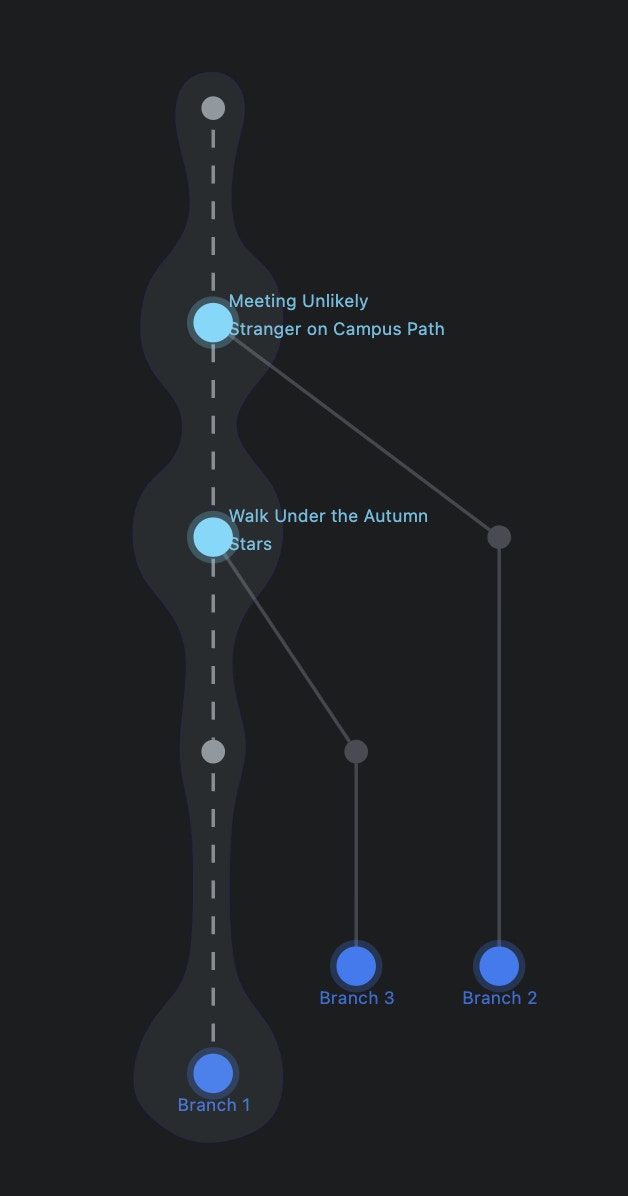
4. **Open the Branch Map** to see all your timelines as a visual tree
5. **Jump instantly** to any branch or checkpoint with one tap
### What's Different
**Before:**
* Duplicate entire chatrooms manually
* Copy-paste context and summaries
* Manage multiple separate chats
* Lose track of which timeline is which
* Switch between rooms constantly
**Now:**
* ✨ One button creates a new branch
* 🚀 All timelines in ONE room
* 🗺️ Visual Branch Map shows every path
* ⚡ Jump between any timeline instantly
* 📍 Never lose progress or context
Create as many branches as you want from any moment. Every possibility can
exist.
The Branch Map shows your entire story tree with glowing nodes for easy
navigation.
All branches stay in one room. No copy-paste, no summaries, no duplicate
chats.
Click any node to instantly jump to that timeline. Compare paths
effortlessly.
**Pro Tip**: Create branches at pivotal decision points so you can explore
every "what if" scenario without commitment. You can always jump back to any
branch later.
***
## 2) 🌳 The Branch Map: See Your Story Universe
Visualize your entire narrative tree and navigate between any timeline with a
single tap.
The Branch Map transforms your chat into an explorable story universe. Every branch appears as a glowing node. Click to jump instantly.
### Branch Map Features
See every path you've explored laid out as an interactive tree diagram
Each checkpoint glows to show you exactly where you can jump to
Always know which timeline you're in and where it branched from
Click any node to instantly transport to that branch—no loading, no context
loss
### Real-World Example
**Pivotal Scene**: Your character stands at a crossroads. Do they confront the villain, flee to safety, or try to negotiate?
**Branch 1**: Confrontation → explore the action path\
**Branch 2**: Flee → see the survival storyline\
**Branch 3**: Negotiate → discover the diplomatic route
All three timelines exist. All are instantly accessible. All progress is saved. The Branch Map shows them all at once.
The Branch Map makes it easy to compare how different choices affect your
story without losing any of your creative work.
***
## 3) 🎯 Why This Changes Everything
### The Problem We Solved
Before branching, roleplayers faced these painful limitations:
* **Forced Choice**: Pick one path, lose the rest forever
* **Manual Duplication**: Copy entire chatrooms to try alternate paths
* **Context Loss**: Summarize and re-explain plot when switching rooms
* **Room Clutter**: Manage dozens of duplicate chats for one story
* **Navigation Hell**: Can't remember which room has which version
### The Solution
Explore every idea without abandoning good paths. All possibilities coexist.
Everything stays in one place. No room-switching, no context re-entry.
See exactly where you are and where you've been with the Branch Map.
Jump to any moment, any branch, any timeline with one tap.
**What Users Say:**
*"I'VE WAITED 2 YEARS FOR THIS."* — Character.AI user on branching
*"The amount of times I've wished I could branch off and explore different options without losing my progress."* — Reddit r/CharacterAI
*"Sometimes I have so many ideas for a response that could completely change the way the story goes."* — JanitorAI user
*"That **sht** was godly."* — User praising chat branching features
***
## 4) 🚀 Common Use Cases
### For Roleplayers
* **Explore romance vs. friendship** paths with the same character
* **Test different dialogue choices** at crucial moments
* **Keep "canon" timeline** while experimenting with wild ideas
* **Compare character reactions** to different approaches
### For Story Writers
* **Branch at plot forks** to see which direction is more compelling
* **Explore multiple endings** without deleting previous ones
* **Test character development** paths side by side
* **Save "deleted scenes"** as branches instead of losing them
### For Character Creators
* **Test character consistency** across different scenarios
* **Explore personality boundaries** with extreme choices
* **See how characters handle** opposite decisions
* **Collect examples** of best character responses across branches
***
## 5) ✨ Quality-of-Life Features
The system highlights natural branching points in your conversation
Optionally name branches to remember what each timeline explores
Hover over nodes to preview that branch without jumping to it
Never accidentally lose work—every branch is preserved independently
***
## 6) 🎨 How It Compares
### Character.AI
* **What they have**: Basic "duplicate to here" feature
* **What they lack**: No visual Branch Map, requires creating new chat rooms
* **User reaction**: Waited 2 years for it, called it "godly" when it arrived
### JanitorAI & Chai
* **What they have**: Nothing—users actively requesting this feature
* **Quotes**: *"Character AI has it. Why can't JAI? It opens up so much potential."*
### mefriend.ai
* ✨ **Visual Branch Map** for easy navigation
* 🚀 **One room, infinite timelines** (no room-switching)
* ⚡ **Instant jumping** between any branch
* 🗺️ **Interactive story tree** with glowing nodes
* 📍 **Zero context loss** or manual duplication
***
**Ready to explore every path?**
1. Find a moment in your chat where you want to branch
2. Click the **Branch** button 🌿
3. Continue your story in the new timeline
4. Open the **Branch Map** 🗺️ to see all your paths
5. Jump between timelines instantly
Your story is no longer linear. It's a universe of possibilities—and they're all one tap away.
**Every path. Every idea. Every possibility. Explore every direction.** ✨