> ## Documentation Index
> Fetch the complete documentation index at: https://docs.mefriend.ai/llms.txt
> Use this file to discover all available pages before exploring further.

# Custom URLs & Rich Previews (v1.12 – Jul 14 2025)

> Reserve intuitive .mai URLs for your characters and users, and see them shine with Open Graph previews.

Clean URLs, memorable identities, and rich social previews.\
No more cryptic character IDs—just beautiful `.mai` addresses that shine wherever you share them. ✨

## 1) 🔗 Custom Character & User URLs

<Check>
  Say goodbye to random IDs—hello to meaningful, shareable addresses.
</Check>

* **Intuitive Structure**
  Every user and character now lives at a clean, memorable address:

  ```
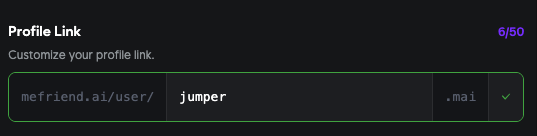
  https://mefriend.ai/user/jumper
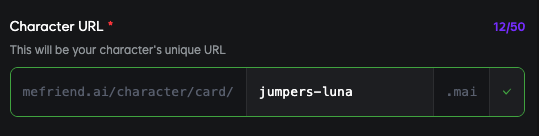
  https://mefriend.ai/character/card/alana-1.mai
  ```

* **.mai Identifiers**
  We've introduced `.mai` identifiers as a simple, branded namespace.

### Setting Up Your URLs

<div
  style={{
display: "grid",
gridTemplateColumns: "1fr 1fr",
gap: "2rem",
margin: "2rem 0",
}}
>
  <div>
    <h4 style={{ textAlign: "center", marginBottom: "1rem" }}>
      👤 User URL Setup
    </h4>

    <img
      src="https://mintcdn.com/mefriendai/iZWPR2FSlDNy9U-1/images/changelog/2025_07_14/user_link_edit.png?fit=max&auto=format&n=iZWPR2FSlDNy9U-1&q=85&s=128fe9363be12e32bac05e6e0b9a16f4"
      alt="User URL Setup Interface"
      style={{
    borderRadius: "12px",
    boxShadow: "0 8px 32px rgba(0, 0, 0, 0.12)",
    border: "1px solid rgba(0, 0, 0, 0.08)",
    width: "100%",
    height: "auto",
  }}
      width="537"
      height="136"
      data-path="images/changelog/2025_07_14/user_link_edit.png"
    />
  </div>

  <div>
    <h4 style={{ textAlign: "center", marginBottom: "1rem" }}>
      🤖 Character URL Setup
    </h4>

    <img
      src="https://mintcdn.com/mefriendai/iZWPR2FSlDNy9U-1/images/changelog/2025_07_14/character_link_edit.png?fit=max&auto=format&n=iZWPR2FSlDNy9U-1&q=85&s=1c6c89175ff702b45187a61b8cda48dd"
      alt="Character URL Setup Interface"
      style={{
    borderRadius: "12px",
    boxShadow: "0 8px 32px rgba(0, 0, 0, 0.12)",
    border: "1px solid rgba(0, 0, 0, 0.08)",
    width: "100%",
    height: "auto",
  }}
      width="539"
      height="136"
      data-path="images/changelog/2025_07_14/character_link_edit.png"
    />
  </div>
</div>

<CardGroup cols={2}>
  <Card title="Reserve Your Identity" icon="user">
    Users can **reserve** any available `<slug>` identifier.
    **Where to configure:** Go to **Edit Profile → URLs**.
  </Card>

  <Card title="Character Control" icon="robot">
    Characters can **reserve** or **change** their `<slug>.mai`.
    **Where to configure:** In the Character Editor, under **Create/Edit → Advanced Options → URLs**.
  </Card>
</CardGroup>

<CardGroup cols={2}>
  <Card title="Easy Migration" icon="arrows-rotate">
    Want to switch from your old link? Just update your slug and we'll redirect
    all traffic automatically.
  </Card>

  <Card title="Social Ready" icon="share-nodes">
    Share your `.mai` link on social media, docs, or email signatures—no more
    cryptic IDs.
  </Card>
</CardGroup>

<Info>
  Want to switch from your old link? Just update your slug in the above settings
  and we'll redirect all traffic automatically.
</Info>

***

## 2) 🌐 Open Graph (OG) Previews for URLs

<Check>
  Beautiful link previews everywhere—your profiles and characters deserve to
  shine.
</Check>

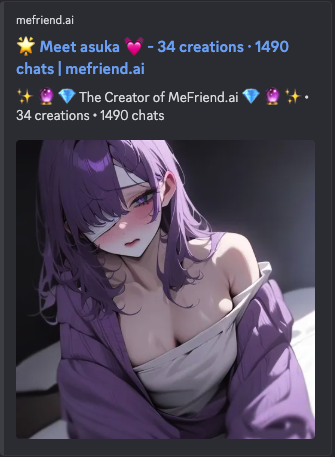
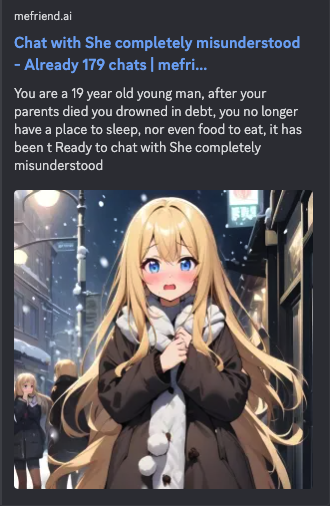
Your user and character pages now support **Open Graph** meta tags, so wherever you share your `.mai` link, it comes with a beautiful preview:

### Preview Examples

<div
  style={{
display: "grid",
gridTemplateColumns: "1fr 1fr",
gap: "2rem",
margin: "2rem 0",
}}
>
  <div>
    <h4 style={{ textAlign: "center", marginBottom: "1rem" }}>
      👤 User Profile Preview
    </h4>

    <img
      src="https://mintcdn.com/mefriendai/iZWPR2FSlDNy9U-1/images/changelog/2025_07_14/user_og.png?fit=max&auto=format&n=iZWPR2FSlDNy9U-1&q=85&s=72a7ab056db3101cff366132400e5aa4"
      alt="User Profile OG Preview Example"
      style={{
    borderRadius: "12px",
    boxShadow: "0 8px 32px rgba(0, 0, 0, 0.12)",
    border: "1px solid rgba(0, 0, 0, 0.08)",
    width: "100%",
    height: "auto",
  }}
      width="335"
      height="457"
      data-path="images/changelog/2025_07_14/user_og.png"
    />
  </div>

  <div>
    <h4 style={{ textAlign: "center", marginBottom: "1rem" }}>
      🤖 Character Profile Preview
    </h4>

    <img
      src="https://mintcdn.com/mefriendai/iZWPR2FSlDNy9U-1/images/changelog/2025_07_14/character_og.png?fit=max&auto=format&n=iZWPR2FSlDNy9U-1&q=85&s=3eb42080c38705053396973ab2bbb4ad"
      alt="Character Profile OG Preview Example"
      style={{
    borderRadius: "12px",
    boxShadow: "0 8px 32px rgba(0, 0, 0, 0.12)",
    border: "1px solid rgba(0, 0, 0, 0.08)",
    width: "100%",
    height: "auto",
  }}
      width="330"
      height="506"
      data-path="images/changelog/2025_07_14/character_og.png"
    />
  </div>
</div>

<CardGroup cols={2}>
  <Card title="Smart Titles" icon="heading">
    **Title & Description** pulled from your Profile or Character Bio
  </Card>

  <Card title="Rich Images" icon="image">
    **Thumbnail Image** uses your chosen avatar or cover art
  </Card>
</CardGroup>

* **Platform Ready** - Works seamlessly across Facebook, Twitter, Discord, Slack, and more

<Info>
  Not familiar with OG? Open Graph tags tell platforms like Facebook, Twitter,
  and Slack which title, description, and image to show when a link is shared.
  It makes your profiles and characters pop!
</Info>

***

## 3) ✨ Quality-of-Life Improvements

<CardGroup cols={2}>
  <Card title="Automatic Redirects" icon="route">
    Changed your URL? Old links automatically redirect to your new address.
  </Card>

  <Card title="SEO Optimized" icon="magnifying-glass">
    Your `.mai` pages are now search engine friendly with proper meta tags.
  </Card>
</CardGroup>

***

<Note>
  **Ready to get started?**

  1. Visit **Edit Profile → Profile Link** to reserve your `slug-you-want`.
  2. In Character Editor, open **Create/Edit → Advanced Options → Character URL** to set your character's `slug-you-want.mai`.

  Enjoy your new, shareable identity!
</Note>